


Ecwid Ecommerce
4.51.02K Reviews
App Specs
- Version
- 9.15.2
- Updated On
- License
- Free
- Downloads
- 500,000+
- Developer
- Ecwid by Lightspeed
- Categories
- Business
- Platform
- Android
Screenshots



 Analysis by AppCompare
When I look at a mobile store app, I care less about a grand promise than about whether it helps me handle the small jobs that keep a shop moving: checking products, staying on top of orders, and making sensible changes without sitting down at a computer. Ecwid Ecommerce is built for that kind of hands-on work. It gives a small business owner a way to manage an online shop from a phone, though I’d still treat it as a practical companion to a wider selling setup rather than assume an app alone will solve every part of running a business.
Where the mobile app fits today
Ecwid Ecommerce is a free business app from Ecwid by Lightspeed, and it has been available since November 25, 2015. Its current version is 9.14, with Android 8.0 as the minimum operating system. The app is rated for Everyone, which fits a general shop-management tool, and its 4.5 average from around 7,800 ratings suggests a broadly positive reception. More than 500,000 installs show that it has found a substantial audience among merchants.
The key question is what you want to do from your phone. I see the strongest fit for someone who already has products to sell and wants a more manageable way to keep the store in view during the day. It can be useful between errands, while preparing an order, or when a customer asks whether a particular item is available. If you are still deciding what to sell or building a business plan, it won’t make those choices for you; its value starts when there is a shop to operate.
What the version history can—and cannot—tell you
The current version number is a useful sign that Ecwid Ecommerce is an actively maintained mobile product, but a version number on its own doesn’t explain what changed in each release. I wouldn’t read 9.14 as proof that a particular tool is new, or assume that every feature described in a general overview arrived recently. For a buyer, the safer takeaway is that the app has continued through multiple iterations since its original release, while the exact improvements that matter to you should be judged in the current app.
That distinction matters because store owners can build routines around a mobile tool. Before moving daily work onto it, I’d check that the screens you rely on are comfortable on your device and that the tasks you care about are accessible without awkward workarounds. A seller who only needs occasional order checks has different expectations from someone who intends to update a large catalog from a phone.
Running a shop without turning the phone into the whole business
I find it useful to think of a phone-based shop app as a way to shorten the gap between noticing a task and dealing with it, not as a reason to move every business decision onto a small screen. In this section, I’ll focus on where mobile access can genuinely help during a busy day, while keeping room for the more deliberate work that often benefits from a larger workspace.
Getting Started with Ease
First things first, setting up Ecwid Ecommerce is a breeze. I was up and running in no time. The app offers a seamless installation process, and before I knew it, I was customizing my storefront. The user interface is intuitive, even for those of us who aren’t tech-savvy. You don’t need to be a coding wizard to make your store look fantastic.
Worth Reading Before You Choose

EA SPORTS FC Mobile 26 Is a Bigger Football Game, but It Takes Time

Flipboard Shows What News Apps Must Do Beyond the Feed

Switching to Android Auto Means Rethinking Your Driving Routine

Google Calendar Makes a Crowded Week Easier to Manage

Ludo King Makes the Most of the Minutes Between Plans

Baby Panda World Brings Quick Play to Modern Phones, but Its Game Library Feels Busy
The app provides a variety of templates to choose from. Whether you're selling jewelry or digital downloads, there’s something for everyone. Customization is straightforward, allowing you to add your personal touch without any hassle. You can tweak colors, fonts, and layouts until everything is just right.
Feature-Packed for Success
What really impressed me about Ecwid is its rich set of features. You can sell on multiple platforms simultaneously, including social media giants like Facebook and Instagram. This multi-channel capability means you can reach customers wherever they are, maximizing your sales potential.
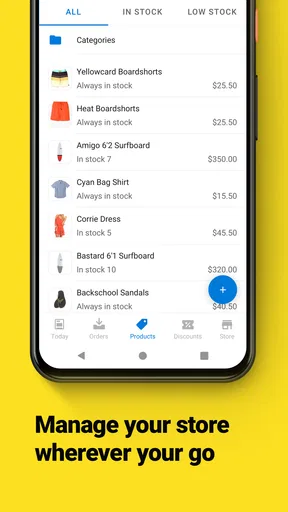
Inventory management is another strong suit. The app keeps track of stock levels, notifies you of low inventory, and even updates your customers when products are back in stock. This is a lifesaver for anyone who’s had to manually track inventory before.
If you’re concerned about payment options, Ecwid has you covered. It supports over 50 payment gateways, giving your customers flexibility in how they pay. Plus, it ensures all transactions are secure, so both you and your buyers can have peace of mind.
Simplifying Shipping and Taxes
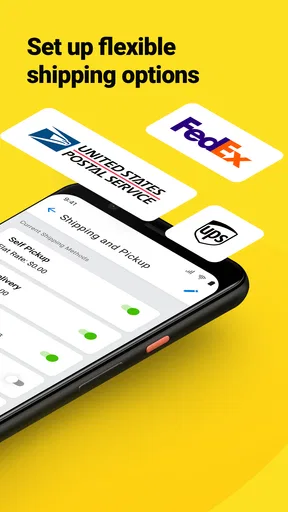
Shipping and taxes can often be a headache, but Ecwid simplifies this with built-in tools that help calculate shipping rates and taxes automatically. You can set different rates for different regions, making it easier to manage orders from around the globe.
The app also integrates with major carriers, allowing you to offer real-time shipping rates to your customers. This transparency can significantly improve the shopping experience, potentially leading to increased sales and customer satisfaction.
Marketing Made Easy
When it comes to marketing, Ecwid doesn’t disappoint. The app offers several marketing tools to help you promote your store. From automated email campaigns to discount coupons, you have everything you need to attract and retain customers.
The SEO features are particularly handy. You can optimize product listings with meta tags and descriptions, ensuring your store is easily discoverable on search engines. This is crucial for driving organic traffic and boosting your online presence.
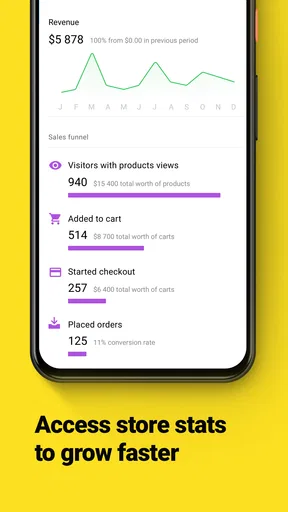
Additionally, you can track your store’s performance with detailed analytics. Knowing what’s working and what’s not allows you to make informed decisions, optimizing your strategy for better results.
Keeping existing routines practical
For an established seller, the most useful mobile habit is to make quick checks rather than attempt every task on a small screen. I’d use the inventory view to confirm stock before promising an item, then review an order and its shipping details when there’s a quiet moment. That simple sequence can prevent a mismatch between what a customer sees and what is actually available. It also keeps the phone useful without making it the only place where the business is managed.
A second practical workflow is to prepare product information carefully before publishing changes. Product names and descriptions need to be clear to shoppers, while stock counts need to match what is on hand. If you update a listing while distracted, a typo or incorrect quantity can create more work later. I’d treat mobile edits as ideal for small corrections, while larger catalog reorganizations are easier to review on a bigger screen.
Social selling also works best when the shop owner has a consistent process. Rather than posting an item everywhere and hoping for orders, decide which products suit each channel, keep the product details aligned, and check that stock changes are reflected across the places where you sell. Multi-channel selling can widen your reach, but it also creates more places to monitor. The convenience is real only if you make time to keep those channels in sync.
A realistic day for a small seller
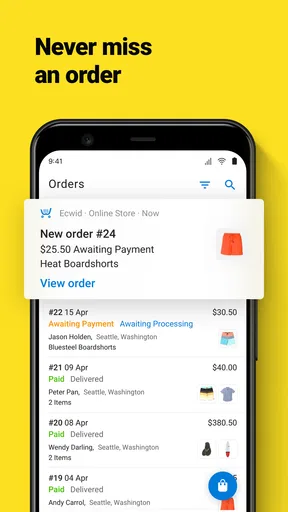
Imagine I sell handmade accessories and spend the morning away from my work area. A customer asks about a particular color while I’m out buying packing supplies. I can check the shop’s inventory before answering, avoiding a promise I may not be able to keep. Later, when an order comes in, I can review it and make sure I know what needs to be packed. This is where a phone-based store tool earns its place: it reduces the delay between a question and a useful answer.
The same scenario also shows the limit. If I need to photograph a new collection, rewrite many descriptions, compare sales patterns, and rethink the storefront layout, I would not want to do all of that on a phone. The app can help me stay connected to the shop, but serious planning and detailed editing benefit from a larger workspace. In my view, the best arrangement is mobile access for timely checks and a more comfortable setup for bigger jobs.
Choosing it over a marketplace or a full desktop workflow
Compared with selling only through a marketplace, a dedicated ecommerce store gives a merchant a more direct place to present products and shape the shopping experience. The trade-off is that a marketplace can bring shoppers who are already browsing there, while a standalone shop usually asks the owner to do more of the work of attracting visitors. Ecwid’s ability to sell through multiple channels can help bridge that gap, but it does not remove the need to decide where customers will discover the products.
Compared with managing everything through a desktop browser, a mobile app is more convenient for quick checks and on-the-go decisions. A desktop remains preferable for long sessions involving detailed product editing or careful review of business information. I wouldn’t choose between those approaches as if only one can be useful: the phone is for responsiveness, while a larger screen is better when the task demands concentration.
The app is a stronger match for a small or growing seller who values straightforward store management and wants to connect selling channels. It is less compelling for someone who has no interest in maintaining an online catalog, or who expects a mobile tool to generate demand without active promotion. Sellers with complex operations should also assess whether the available workflows suit their specific needs before relying on it for every business process.
Costs, support, and sensible checks
The app itself is free to download, but in-app purchases range from $24.99 to $399.99 per item. That makes it worth checking what a particular purchase includes and whether it fits the way you plan to run the store before committing. I would think about the business need first—such as whether a paid option solves a real limitation in your workflow—rather than treating an upgrade as an automatic step after installation.
Before using any ecommerce tool as the main record of day-to-day activity, I’d also test a few ordinary tasks: locate a product, check its available stock, review an order, and confirm how the store presents the information customers need. That small trial tells you more than simply browsing menus. It also helps reveal whether the mobile interface suits your working style, especially if you manage products in short bursts between other responsibilities.
Customer Support: Always There for You
Lastly, let’s talk about customer support. Ecwid offers 24/7 support, which is a godsend if you run into any issues. Their team is responsive and knowledgeable, ready to assist you at any time. Plus, there’s a comprehensive help center loaded with resources and guides to help you troubleshoot common problems on your own.
In conclusion, Ecwid Ecommerce is a fantastic solution for anyone looking to start or expand their online business. It combines ease of use with powerful features, making ecommerce accessible to everyone. Whether you’re a seasoned entrepreneur or a newbie dipping your toes into the online marketplace, this app is worth checking out. Happy selling!
What I would watch before making it central
If I were choosing it for a shop, I’d pay attention to how comfortably the mobile routine holds up as the catalog and order volume grow. A setup that feels simple with a few products may take more care once several selling channels and frequent stock changes are involved. The key is not just whether a feature exists, but whether it saves time after accounting for the extra checks that multi-channel selling can require.
I’d also keep expectations grounded around the difference between running a store and growing one. Tools for listings, promotion, and performance can support good decisions, but they still depend on clear product information and a reason for customers to visit. Ecwid Ecommerce makes sense to me when the owner wants a practical way to manage an online shop and is willing to handle those business decisions. If you mainly need a place to list a few items with minimal ongoing effort, or you prefer a marketplace to handle discovery, a simpler marketplace-first approach may be a better fit.
My recommendation is to start with a small, representative part of your workflow: add or review a product, check the stock, and follow an order through the steps you normally handle. If that feels natural, the app can become a useful everyday control point. If the important tasks feel cramped or require frequent switching to a computer, use it selectively rather than forcing the entire business into a mobile routine. That is the distinction I’d keep in mind: a helpful shop companion, not a substitute for choosing the right selling strategy.
Pros
- User-friendly interface for quick setup.
- Seamless integration with social media.
- Supports multiple payment gateways.
- Customizable for various business needs.
- Responsive customer support team.
Cons
- Limited design customization options.
- Advanced features require higher plans.
- May require third-party apps for SEO.
- Mobile app has limited functionality.
- Transaction fees on some payment methods.
FAQs for Ecwid Ecommerce
What is Ecwid Ecommerce?
Ecwid Ecommerce is a versatile platform that allows users to create and manage online stores. It integrates seamlessly with various websites and social media platforms, making it easy for businesses to expand their reach. The app provides tools for inventory management, order processing, and marketing, catering to both beginners and experienced sellers.
Is Ecwid Ecommerce suitable for beginners?
Yes, Ecwid Ecommerce is designed to be user-friendly and accessible for beginners. It offers simple setup processes and intuitive navigation. The platform provides step-by-step guidance, tutorials, and support to help new users build and manage their online stores effectively without needing advanced technical skills.
What platforms does Ecwid Ecommerce support?
Ecwid Ecommerce is highly versatile and supports integration with multiple platforms, including websites built on WordPress, Wix, and Joomla. It also allows users to sell on social media platforms like Facebook and Instagram, making it accessible to customers across various online spaces.
Are there customization options available in Ecwid Ecommerce?
Ecwid Ecommerce offers a range of customization options to tailor your store to fit your brand. Users can choose from various themes and templates and have the flexibility to customize product displays, checkout processes, and more. Advanced users can also use CSS for further customization.
Does Ecwid Ecommerce offer support for multiple payment methods?
Yes, Ecwid Ecommerce supports a wide array of payment methods to cater to global customers. It integrates with popular payment gateways such as PayPal, Stripe, and Square, allowing businesses to accept credit cards, digital wallets, and other payment forms securely and efficiently.


